Skip to content

Purchase Order Template

What a buyer sends a supplier: the items wanted, agreed prices, where to deliver and by when. Start from the full example below: change anything, and download it as a PDF, a Word file or an Excel sheet that look exactly like the preview. Free, with no signup and no watermark.

  • Never stored
  • No queue, no waiting
  • No signup, no watermark
Look
Corporate
Currency
US Dollar (USD)
Tax lines
None (add your own)
Extra columns
Item code, Unit
Paper
A4 (switch to US Letter in Design)
Download
PDF, Word (.docx) and Excel (.xlsx)

How to write a Purchase Order

  • Number the PO and ask the supplier to quote it on their invoice; that is how the two are matched.
  • Spell out delivery address, delivery date and payment terms; a PO is a contract once accepted.
  • State prices as agreed and whether they include tax and delivery.

Purchase Order example

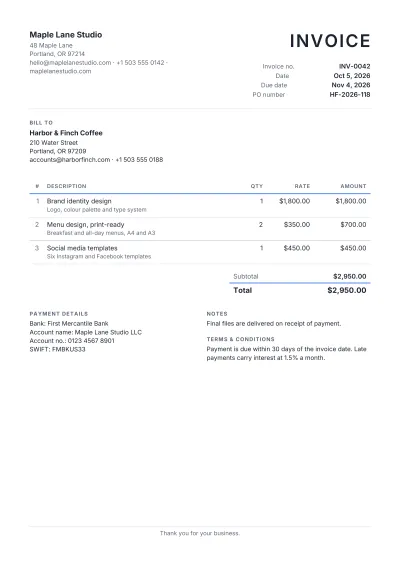
The whole example as text, so you can see what goes where. Every business and person in it is made up.

Harbor & Finch Coffee

210 Water Street

Portland, OR 97209

purchasing@harborfinch.com · +1 503 555 0188

Purchase Order

PO no.
PO-2026-0231
Date
Oct 6, 2026
Deliver by
Oct 13, 2026
Payment terms
Net 30
Requested by
Jordan Blake, Head Barista

Vendor

Cascadia Roasters Inc.

900 SE Division Street

Portland, OR 97202

orders@cascadiaroasters.com · +1 503 555 0160

Ship to

Harbor & Finch Coffee — Kitchen

210 Water Street, rear entrance

Portland, OR 97209

DescriptionItem codeQtyUnitRateAmount
House espresso blend, 5 lbWhole beanCR-ESP-512bags$62.00$744.00
Single-origin Ethiopia, 5 lbWhole bean, washedCR-ETH-56bags$74.00$444.00
Oat milk, barista edition12 × 1 LOM-BAR-128cases$38.00$304.00
Subtotal
$1,492.00
Total
$1,492.00

Notes

Please quote the PO number on your invoice and the delivery note. Deliveries Tuesday to Friday, 7–10 am.

Thank you for your business.
Other invoice types

All 66 invoice types

How it works

1

Open the example

Press “Use this template” and the Purchase Order example opens in the editor, with the preview beside it.

2

Make it yours

Type over your business and your customer, add or remove lines, set the tax; the totals and the preview update as you type.

3

Download it

PDF for sending, Word for editing, Excel for your books. All three carry the same lines and totals.

Frequently asked questions

Is this Purchase Order template free?

Yes. Editing, every look and the PDF, Word and Excel downloads are free, with no signup, no watermark and no payment step at the end.

Do I have to use the example?

No. “Use this template” opens the example ready to edit; “Start empty” keeps the Purchase Order fields and tax lines with nothing filled in.

Can I switch to another type or look later?

Yes. Your business, your customer and your lines stay as they are when you switch to any of the other 65 invoice types, and the look, colour, font and paper size can be changed at any time.

Where is my invoice kept?

On this computer only, so it is still here when you come back, and your business details are filled in for the next invoice. Nothing is stored anywhere else. “Save a copy” makes a file you can open on another computer.

Good to know: The total in words is written in English. Arabic and Urdu text reads right to left, but the page layout is not mirrored. The Word download keeps the design, but lines can break a little differently than in the PDF. Your invoice and your business details are kept on this computer until you remove them.

Put this tool on your website

Free for any blog, class page or help article. Paste one snippet and your visitors can use it right on your page.